> For the complete documentation index, see [llms.txt](https://docs.sevenpens.com/drawtab/llms.txt). Markdown versions of documentation pages are available by appending `.md` to page URLs; this page is available as [Markdown](https://docs.sevenpens.com/drawtab/guides/pen-displays/lamination.md).
# Lamination
## Overview
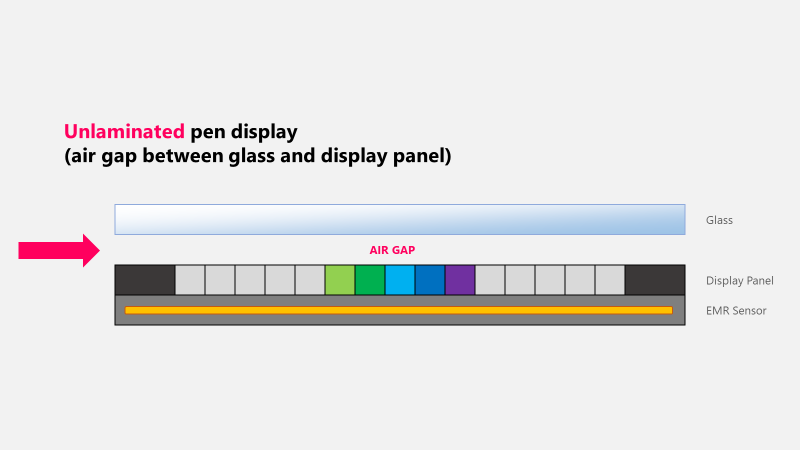
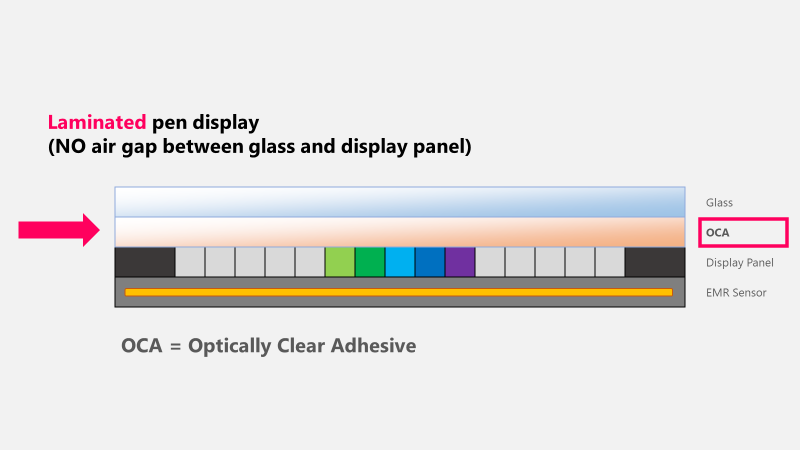
Lamination in the context of a display is the removal of an air gap between the display and the sheet of glass above it. The benefits of lamination are improved parallax and preventing things from getting between the glass and the display.
## The air gap
Especially in older models of pen displays and pen computers, there is an air gap between the display panel and the glass. This air gap itself is another source of parallax.
A laminated display removes the air gap and replaced it with an optically clear adhesive layer. This layer because of optical properties and because it can be thinner than the air gap it replaced also thus reduces the parallax.
It is always preferable to by a drawing tablet that has a laminated display.
## Benefits of lamination
The most obvious benefit of lamination and the removal of the air gap is that it can improve parallax.
However, it can also prevent a things from getting between the glass and display panel such as:
* moisture
* dust and other particles
* small insects (more here: [TSG: Insects in a pen display](/drawtab/troubleshoot/tsg-pen-display-insects.md))
## Resources
* XP-Pen: What does fully laminated screen mean? Fully laminated display vs non laminated display ()
* iPad’s Laminated Display Vs. Non-Laminated Display ()
* Laminated vs non laminated tablet : What is a laminated display?()