> For the complete documentation index, see [llms.txt](https://docs.sevenpens.com/drawtab/llms.txt). Markdown versions of documentation pages are available by appending `.md` to page URLs; this page is available as [Markdown](https://docs.sevenpens.com/drawtab/core/tilt.md).
# Pen tilt
## Introduction
Almost all drawing tablets can detect the tilt of the pen. Tilt support for drawing tablets usually ranges from 0 degrees to 60 degrees.
Tilt is described by two angles: tilt elevation and tilt azimuth.
* elevation = "how much the pen leans over"
* azimuth = "the direction of the lean — like north, west, or northwest"
This video demonstrates tilt. I highly recommend that you watch it.
{% embed url="" %}
## How tilt is used in drawing applications
Using tilt in an application involves letting tilt azimuth or tilt altitude affect properties of a brush.
### Tilt altitude to size
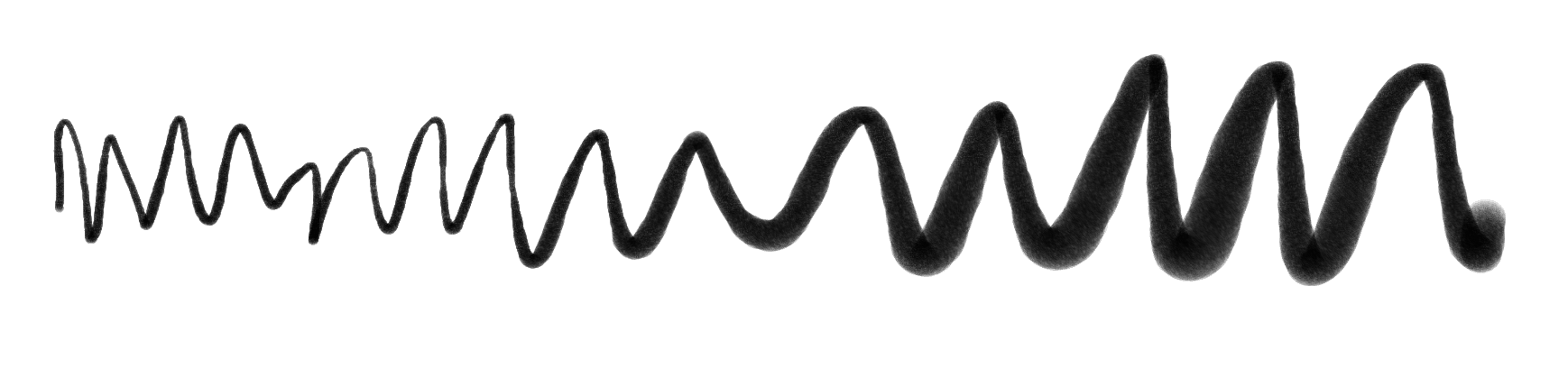
A common use it to let tilt altitude control the width of the stroke. So leaning the pen over increaese the width of the stroke.
For example, below is a stroke I drew with Krita. I configured the brush to ignore pressure entirely, but to let the tilt altitude control the width of the brush. As I drew from left to right, I started with the pen very perpendicular and gradually started tilting the pen.
### Tilt azimuth to size
Typically this means the direction of the tilt controls the rotation of the brush.
## Which tablets support tilt
The vast majority of modern drawing tablets support tilt.
It's easier to list the modern tablets that do not support tilt:
* Wacom One by Wacom Small (CTL-472)
* Wacom One by Wacom Medium (CTL-672)
* Wacom Intuos Medium (CTL-6100 & CTL-6100WL)
* Wacom Intuos Small (CTL-4100 & CTL-4100WL)
* Huion Frego S (L310)
## Do you need tilt support?
For some people tilt is critical and for others, it is not useful at all. It strongly depends on what they are doing.
| Scenario | Is tilt useful? | Notes |
| ------------------------------------------- | --------------- | -------------------------------------------------------- |
| Whiteboarding | Not useful | It's rare for whiteboarding apps to even support tilt. |
| Taking notes | Not useful | It's rare for note-taking apps to even support tilt. |
| Educational videos | Not useful | |
| Digital painting with natural media brushes | Can be useful | Some artists require it. |
| Line art | Can be useful | Many people create line art without using tilt features. |
## Technical details
You don't need to know these details. If you are curious about how an EMR tablet detects pen tilt, see [EMR tilt detection](/drawtab/tech/emr/emr-tilt-detection.md).
## Tilt altitude range
* The standard range for tile altitude is ±60 degrees in both the X and Y directions.
* I don't know of any tablets that support a wider range.
* Some very old tablets have a slightly narrower range.
## Tilt support in applications
See: [Using tilt with your brush](/drawtab/guides/customizing/using-tilt.md)
## Tilt effect on pen tracking accuracy (tilt compensation)
To calculate the pen location, the tablet must account for its tilt. This process is called **tilt compensation**. Remember: no tablet has perfect tilt compensation. You might see some deviation at extreme tilt angles. This is normal.
See [tilt compensation](/drawtab/core/tilt/tilt-compensation.md)
## Disabling tilt
You may not always want to have tilt affect your drawing. It is possible in some cases to disable it. More here: [Disabling pen tilt](/drawtab/guides/customizing/disable-tilt.md)