> For the complete documentation index, see [llms.txt](https://docs.sevenpens.com/drawtab/llms.txt). Markdown versions of documentation pages are available by appending `.md` to page URLs; this page is available as [Markdown](https://docs.sevenpens.com/drawtab/catalog/drawtabs/xppen/xppen-md180uh-notes.md).
# XP-Pen Artist Pro 19 GEN2 (MD180UH) notes
## Links
These links come from the [DrawTabData Explorer](https://thesevenpens.github.io/DrawTabDataExplorer/entity/xppen.tabletfamily.xppen_artistprogen2_2023). To add or fix a link, change it in DrawTabData.
| Source | Link | Date |
| ------------ | ---------------------------------------------------------------------------------------------------------------------------------------- | ---------- |
| XP-Pen | [Product page](https://www.xp-pen.com/product/artist-pro-19-gen-2.html) | |
| XP-Pen | [Store page](https://www.xp-pen.com/store/buy/artist-pro-19-gen2.html) | |
| XP-Pen | [User manual](https://www.xp-pen.com/user-manual/artist-pro-19-gen-2.html) | |
| David Revoy | [XPpen Artist Pro 19 (Gen 2) - review](https://www.youtube.com/watch?v=d8Ft3b002LM) | 2024-11-20 |
| David Revoy | [XPPen Artist Pro 19 (Gen 2) - review on GNU/Linux](https://www.davidrevoy.com/article1053/xppen-artist-pro-19-gen-2-review-on-gnulinux) | 2024-11-14 |
| Seven Pens | [Notes on XP-Pen Artist Pro 19 GEN2 (MD180UH)](https://www.youtube.com/watch?v=y2nDFHThC3A) | 2024-11-03 |
| Parka Blogs | [XPPen Artist Pro 19 (gen 2)](https://www.parkablogs.com/content/review-xppen-artist-pro-19-gen-2) | 2024-10-24 |
| Teoh on Tech | [Xppen Artist Pro 19 (gen 2) review: The era of 4K pen displays approaches](https://www.youtube.com/watch?v=d51hmYgfz5E) | 2024-10-22 |
| Gartzia Artz | [¡MI NUEVO TAMAÑO FAVORITO! XP Pen Artist Pro 19 Gen 2](https://www.youtube.com/watch?v=pAUAEPB_P5k) | 2024-08-28 |
| Brad Colbow | [XP Pen Artist Pro 19 (Gen 2) Review](https://www.youtube.com/watch?v=eByrnaa0vf8) | 2024-08-27 |
| Gartzia Artz | [Unboxing y Primeras impresiones de la XP Pen Artist Pro 19 Gen 2 ¡DIBUJANDO!](https://www.youtube.com/watch?v=Cm-ukaV3opM) | 2024-08-26 |
## Specs
These specs come from the [DrawTabData Explorer](https://thesevenpens.github.io/DrawTabDataExplorer/entity/xppen.tabletfamily.xppen_artistprogen2_2023). Click a model ID to see its full record there.
{% tabs %}
{% tab title="Model" %}
| | [MD180UH](https://thesevenpens.github.io/DrawTabDataExplorer/entity/xppen.tablet.md180uh) |
| ------------ | ----------------------------------------------------------------------------------------- |
| Name | Artist Pro 19 GEN2 |
| Released | 2024-08-19 |
| Status | — |
| {% endtab %} | |
{% tab title="Display" %}
| | [MD180UH](https://thesevenpens.github.io/DrawTabDataExplorer/entity/xppen.tablet.md180uh) |
| --------------- | ---------------------------------------------------------------------------------------------------------------- |
| Resolution | 3840 × 2160 |
| Aspect ratio | 16:9 |
| Pixel density | 238 PPI |
| Panel | IPS |
| Lamination | Yes |
| Anti-glare | Etched glass |
| Coatings | Anti-fingerprint |
| Color gamut |
sRGB 99.8% coverage, 156% area Adobe RGB 96% coverage, 116% area Display P3 98% coverage, 115% area
|
| Attached cable | None |
| Bluetooth | — |
| {% endtab %} | |
{% tab title="Power" %}
| | [MD180UH](https://thesevenpens.github.io/DrawTabDataExplorer/entity/xppen.tablet.md180uh) |
| ------------- | ----------------------------------------------------------------------------------------- |
| Power input | 12 V, 2 A |
| Consumption | — |
| Standby | — |
| Power adapter | — |
| Power output | — |
| {% endtab %} | |
{% tab title="In the box" %}
| | [MD180UH](https://thesevenpens.github.io/DrawTabDataExplorer/entity/xppen.tablet.md180uh) |
| ------------- | ----------------------------------------------------------------------------------------- |
| Contents | — |
| {% endtab %} | |
| {% endtabs %} | |
## Notes on specs
### Digitizer
* NOTE: it has the exact same size Active Area as the Huion Kamvas Pro 19.
### Display
* Color: the 10 bit is 8bit+FRC
### Pens
See [XP-Pen X3 Pro pens](/drawtab/catalog/pens/xppen-pens/xppen-x3propen-notes.md).
* X3 Pro - I tested this. It worked.
## Display experience
### Anti-glare sparkle
* RATING: VERY GOOD. Low amounts of AG sparkle.
* Maybe just slightly more than the Cintiq Pro 22.
* Similar to Huion Kamvas Pro 19
### Pixel sharpness
Pixels are relatively clear and well delineated.
The look is clearly sharper than the Huion Kamvas Pro 19 which has a soft look that some people don't like.
## Design
* Really does look like a larger version of the XP-Pen Artist Pro 16 GEN2
## Drawing experience
### Pen pressure
XP-Pen states these numbers for X3 Pro pens
* IAF: 3gf
* Max Pressure: 400gf
In my testing with the pens that came with the tablet
* Subjectively, 3gf seemed about right
* I measured the max pressure at around 250gf.
### Pressure transition
Moving between low and high pressure cave smooth pressure transitions.
### Accuracy
RATING: VERY GOOD.
My experience matched the accuracy numbers XP-Pen provides.
### Parallax
VERY GOOD.
On par with Cintiq Pro 22 and with Huion Kamvas Pro 19.
### Tilt compensation
OK. Minor displacement at 45deg
* Pen tilted left -> 1.8 mm displacement
* Pen vertical -> \~1 mm displacement
* Pen tilted right -> \~0 mm displacement
### Pressure scan rate testing
RATING: VERY GOOD
Drawing 50 strokes as fast possible results in no lost strokes.
### Diagonal wobble
Rating: GOOD low amounts of diagonal wobble.
* Just a little more than the Huion Kamvas Pro 19
* About the same as the Cintiq Pro 22
* A little less than the XP-Pen Artist Pro 16 GEN2
* About the same as the Huion Kamvas 13 GEN3
* About the same as the XP-Pen Artist 22 Plus
### Surface texture
As is typical for etched glass surfaces, there is a slight surface texture.
Using the same X3 Pro pen with a plastic nib
The XP-Pen Artist Pro 19 GEN2 has an amount of surface texture that is
* about the same as the XP-Pen Artist Pro 19 GEN2
* about the same as the Huion Kamvas Pro 19
* a little less than the XP-Pen Artist 22 Plus
* a little less than the Cintiq Pro 22
## Connections and cabling
### Ports
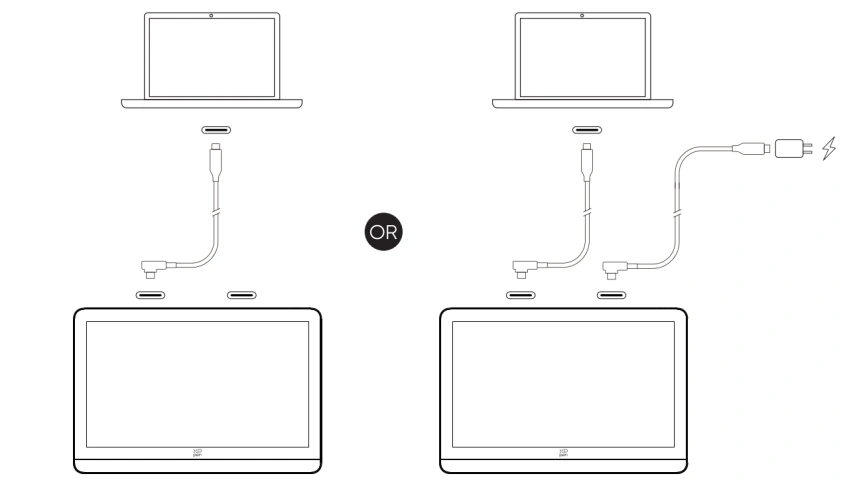
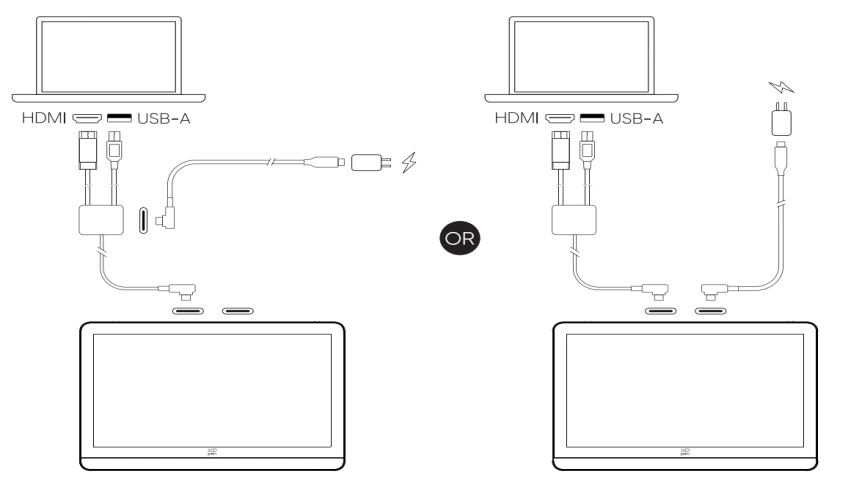
* 2 USB-C ports on the top edge
* The ports are NOT recessed
### USB-C connection options
### HDMI connection options
### How I connected it
I tested both the configurations below with my M3 MacBook Pro and a Surface Pro 8
## Ergonomics
### Legs
This tablet has a two folding legs on the back.
### Stand
I used the stand that came with the Xencelabs Pen Display 16 to hold this tablet. It worked very well.
### Noise
Silent.
### Heat
GOOD. Tablet keeps cool
* Left 1/3 cool
* Right 2/3 slightly warm
* Warmer near the USB-C ports
## Other features
### Audio
There are no audio features such as a headphone jack.


%202024_09_20.png?alt=media&token=39ea372c-20b5-4822-a5fe-beabc6cc798b)